End-to-end opening platform
COMPASS
From the day the deal lands to the day the doors open.
COMPASS is the project management platform an opening runs on — hotels, restaurants, anything with an opening date. Every project end to end, with every department in it.

Proven at scale
1,000+openings
146 countries · Since 2021
What changes
More openings, faster, with the team you already have.
Everything from finance and procurement to tasks, budgets and even the travel around them — the entire opening process end to end in one place, instead of spread across a hundred spreadsheets.
Speed to market
A plan on day one, not in week six.
Cost under control
One number for estimate, budget and actual.
Accountability
Every date and every amount has an owner.
The whole pipeline in view
Where every project stands, without asking anyone for a status.
Less for your teams to carry
Reminders, escalations and reports go out without anyone sending them.
COMPASS in action
A few selected views.
For the complete picture, we'd be glad to walk you through a live demo.
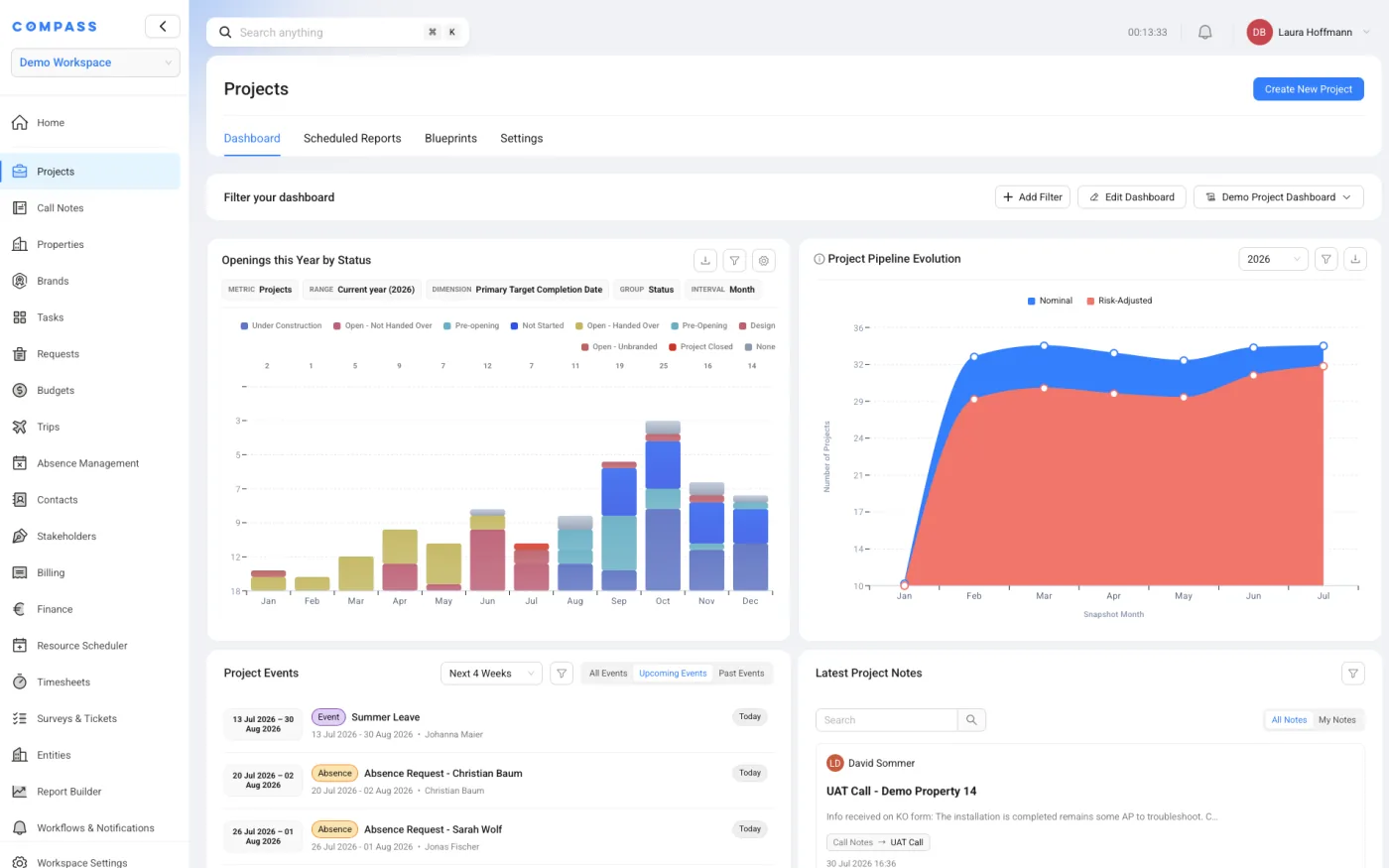
Projects
The pipeline, on one screen
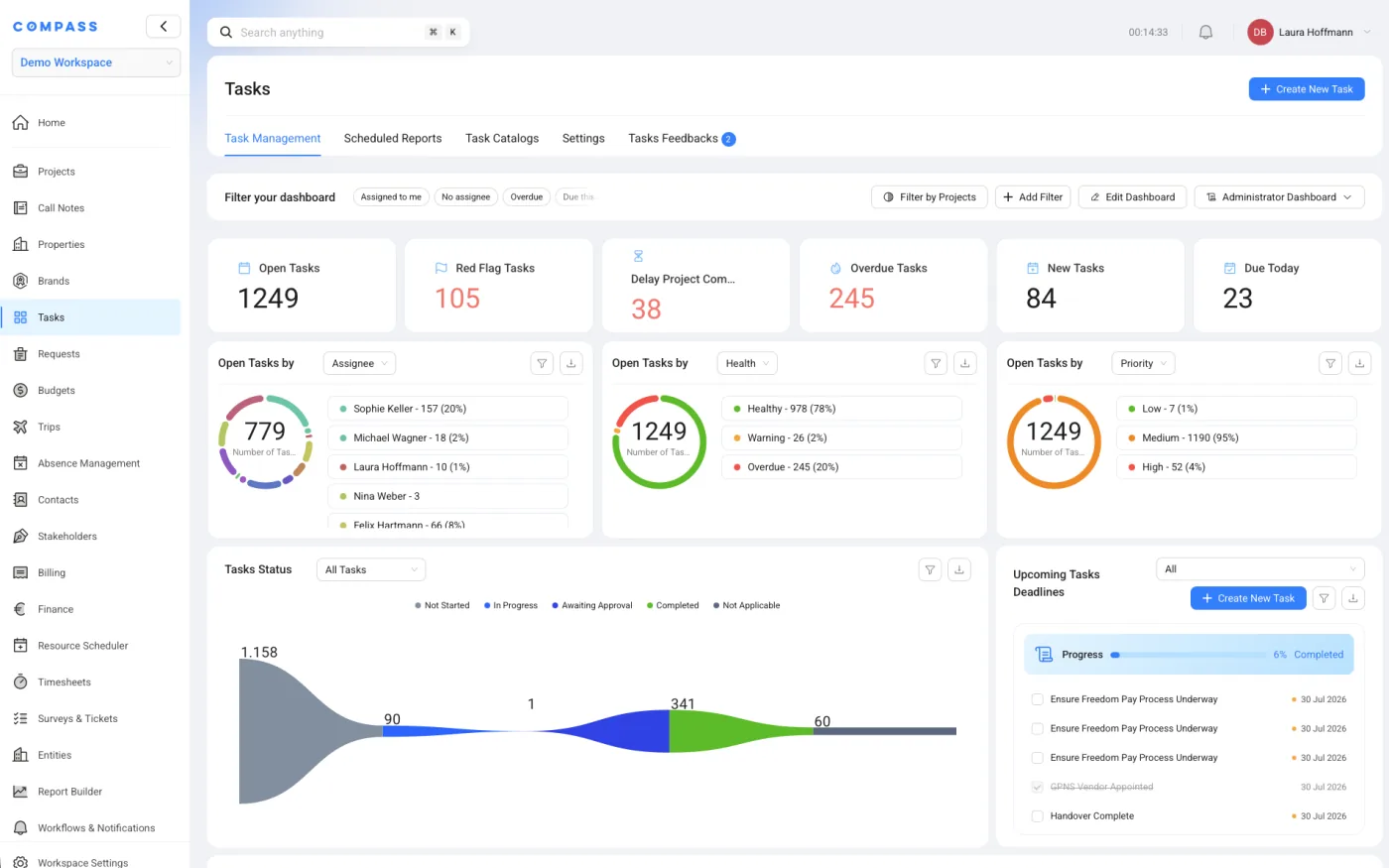
Tasks
Open, overdue, by owner
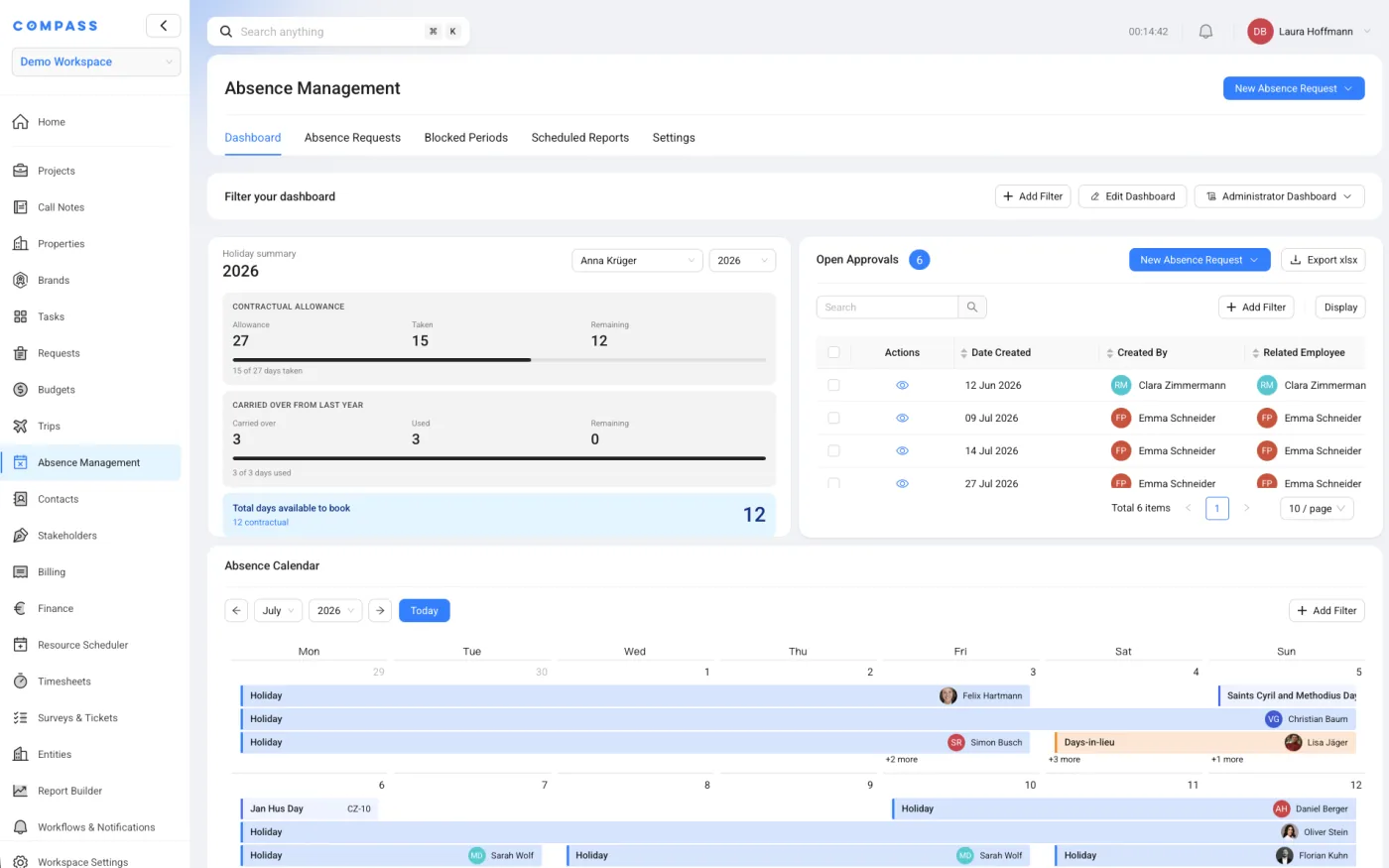
Absence
Requests, approvals, calendar
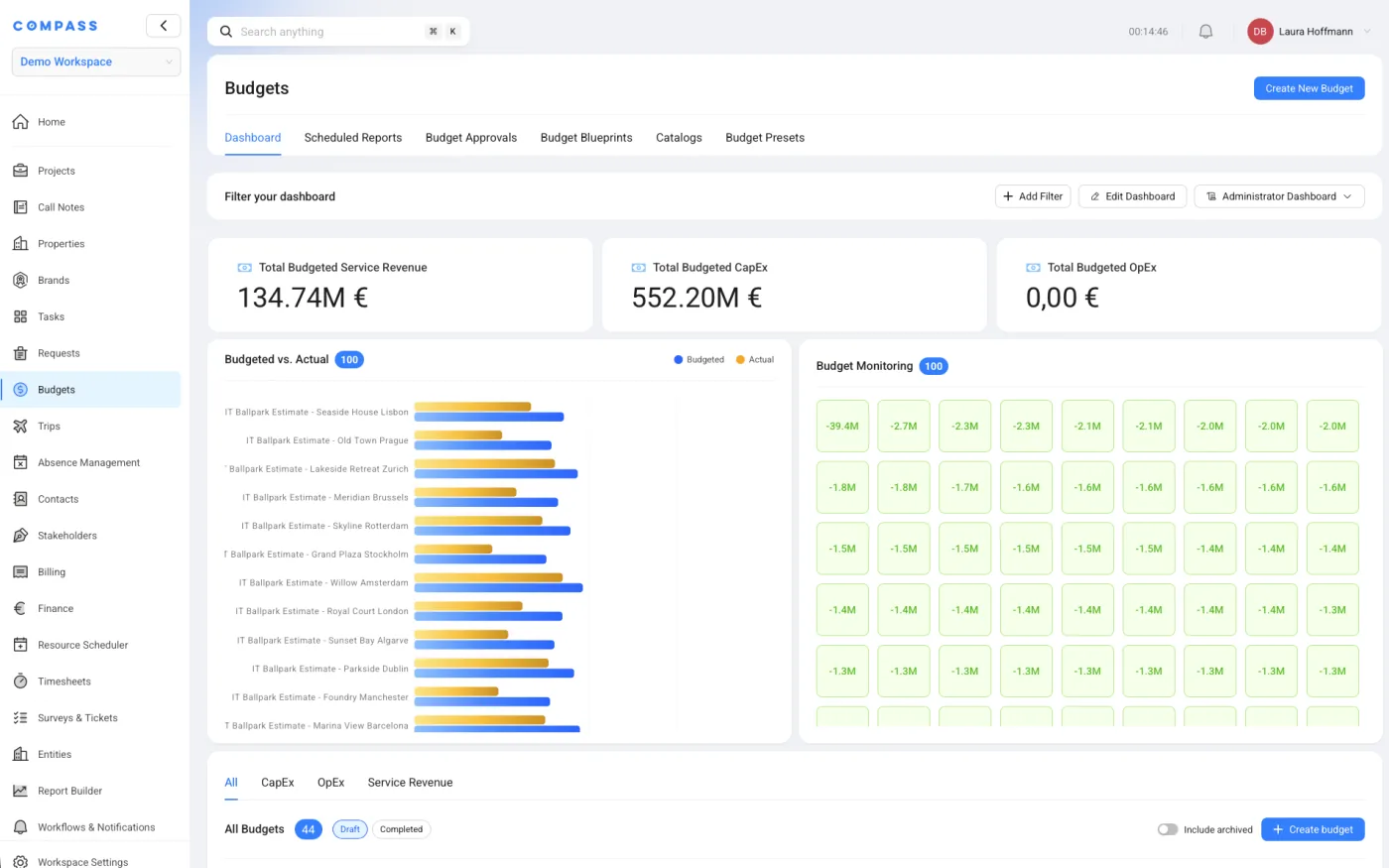
Budgets
Budgeted against actual
- 01Intake
- 02Plan
- 03Execute
- 04Portfolio
Intake
Projects arrive from the system you already run.
Imported on a schedule, merged, completed — and nobody keys a project in twice.
Import & merge
One project, however many records.
Projects come across from your existing project management system on a schedule. Two records for the same project become one, values that disagree with the source are flagged, and whatever never arrived is filled in by hand.
Source system
COMPASS
Completed at intake
Facility details
Read off the design sheet.
Room counts, outlets, back-of-house areas — the numbers every catalogue is sized from. They arrive as a document and are read out of it, rather than typed into the system a second time.
Design sheet
- Rooms240
- F&B outlets3
- Meeting rooms6
- Back-of-house m²1,240
- 01Intake
- 02Plan
- 03Execute
- 04Portfolio
Task list & critical path
One click, and every stakeholder has their tasks.
Internally it is the task list; the on-property team sees the critical path. Both are built from the project's own data — tailored to it, every task arriving when it is due with the description, the documents and the resources that belong to it, and nothing on the list that does not apply.
- Planned completion
- 15 Dec 2026
- Projected completion
- 22 Jan 2027
- Status
- 38 days behind schedule
- Done
- In progress
- Late
- Not started
Applicability
Which projects a task appears on.
Brand, country, project type, service level, owner — the parameters are yours to define, and the rules decide whether the task exists on this project at all.
Content
The same task, written for this project.
Duration, lead time, the description, the files and links that travel with it — every one of them resolved from the project's own parameters rather than copied and edited.
Timing
Created when it is due, not on day one.
Handover tasks do not need to exist in month one. Rules decide when a task is generated as well as whether — so nobody opens a list of four hundred items before there is anything to do.
Assignment
Who it lands on, without anyone assigning it.
Resolved from the project's own roles, so the primary director gets their tasks because they are the primary director.
Catalogues
One catalogue, not a file per combination.
Or do you keep a thousand task lists? Managed premium in Germany. Franchise standard in the Emirates. Every combination its own spreadsheet, every change made in all of them — or made in none of them. COMPASS holds one catalogue and lets the rules produce the combinations.
- 01Intake
- 02Plan
- 03Execute
- 04Portfolio
Budgets
One click, and every budget is priced.
CapEx, pre-opening OpEx and working capital — built the same way the task list is. The catalogues carry the quantity drivers, the applicability rules and the unit costs; the project carries its own parameters. What comes out is this project's budget, line by line, not a template's.
Initial working capital
Cash to open the doors.
€488k
Opening stock, deposits, floats and the first payroll cycles — what has to be in the account before the first customer pays for anything.
Pre-opening · OpEx
The months before revenue.
€842k
Payroll ramp-up, training programmes, pre-opening marketing, task-force travel. Recurring costs with a term and a frequency, not one-off purchases.
CapEx
What stays in the building.
€1.94m
Furniture, equipment, kitchen, IT infrastructure, signage. Per-unit where it scales, fixed where it doesn't — and it feeds procurement directly.
How it gets there
Generated, not assembled.
Every line sits in a catalogue with a unit cost, a vendor and a lead time. The rules decide which lines apply, how many of each this facility needs, and what each one costs on this project. Press once and the budget exists — then fine-tune whatever you want.
And then it is tracked
Estimate, budget, actual, remaining.
The four never live in different files. Variance is calculated as the actuals land, and what is left is a number, not an exercise.
- Estimate
- Budget
- Actual
- Remaining
€127k over budget
- 01Intake
- 02Plan
- 03Execute
- 04Portfolio
Delivery
Nobody spends Tuesday chasing status.
A dashboard someone built themselves, a rule that catches the slip, a report nobody sent.
Personal dashboards
Everyone builds their own.
Widgets
Your dashboard
Resource scheduler & absence
Who is actually available.
Trips, trainings, holidays and public holidays on one calendar. Entitlements are calculated from each contract, carry-over and days in lieu included, public holidays pulled per country.
- Public holiday
- Conflict detected
Project health
Health, without asking.
- 14healthy
- 5at risk
- 2overdue
Timesheets, trips & billing
Hours and trips become invoices.
Workflows & notifications
Nothing waits for someone to notice.
Ifa task slipsthenemail the director
Placeholders filled from live project data.
Scheduled reports
Monday, 07:00.
- M
- T
- W
- T
- F
- S
- S
- Directors
- Dept. head
- External owner
Files & sharing
Share a file, not your drive.
Internal folders with real permissions, and external links you decide the shape of — view only, downloadable, password-protected, expiring. Nobody gets a login to find out what else is in there.
Project files
Shared with
- 01Intake
- 02Plan
- 03Execute
- 04Portfolio
Notes
A hundred projects in one call, and nothing written down twice.
Vendor calls, on-property calls, the weekly run through the portfolio. The meeting happens inside COMPASS — project by project, or task by task — and everything it produces comes out of the note that was taken.
Projects call
Vendor call · every second Tuesday
Captured15 / 99
- New build · Germany15 Sep 2026
- Conversion · Poland09 Oct 2026
- Renovation · Spain01 Jun 2027
- New build · Emirates07 Sep 2027
- Conversion · France05 Feb 2028
Call note
Order raised, lead time confirmed at fourteen weeks.
- + Task
- + Attach
- + Update field
Previous note
08 JulSpecification agreed; order to be raised.
Follow-ups
A note becomes next week's task.
The task is created inside the note, assigned and dated. It is what the next call opens on.
Task created in the note
Chase cabling contractor
Technical servicesDue 04 Aug
Call note report
One call, one document.
The minutes are generated from the notes that were taken, and go to the people who need them — including the ones who were not on the call.
COMPASS
Vendor call · minutes
Without leaving the note
Attach the file. Change the date.
Documents upload against the note, and the project's own fields are updated from inside it. Nobody has to go and find the project afterwards.
- Site photos · 4 files
- Target completion15 Sep29 Sep
Project notes & templates
After a site visit, a page.
Longer write-ups belong here too — from your own templates, filed under the call they came from, and searchable months later.
- Vendor call6
- On-property call4
- Executive summary4
- Site visit & trips3
- General notes2
- 01Intake
- 02Plan
- 03Execute
- 04Portfolio
Handover
Closing out is a project of its own.
Procurement running, inspections passing, a defect list shrinking, and a documented decision that it can open.
Procurement
From budget to goods received.
Purchase orders raised straight from the approved CapEx lines, bids compared, receipts booked back against the budget.
- PO raised
- Bids compared
- Goods received
Quality assurance
Checklist, photo, pass or fail.
Area- and room-level inspections from a standard checklist. Inspectors record on site, with photos attached to the failing item.
Punching & snagging
A defect register that shrinks.
Every deficiency logged against its location, assigned, chased and closed — with the count visible to everyone who cares about the date.
- 42
- 36
- 29
- 19
- 11
- 4
Documents & authority to open
One decision, fully evidenced.
Contracts and reports generated from live data into your own templates. What is still outstanding is visible before anyone signs.
- Contracts
- Sign-offs
- QA report
- Outstanding
1 item blocks the decision
- 01Intake
- 02Plan
- 03Execute
- 04Portfolio
Portfolio
How many will actually open this year?
Every plan says one number. Experience says another. COMPASS shows both.
Nominal
124
Risk-adjusted
108
The gap is the projects the system already believes will slip into next year.
- Jan
- Feb
- Mar
- Apr
- May
- Jun
- Jul
- Aug
- Sep
- Oct
- Nov
- Dec
One platform
Everyone who touches the project, in the same system.
Not just your department. Other departments, the owner, the consultants, the vendors — each with exactly the access they should have, and no more.
Your team
Project director · Coordinator
Other departments
Finance · Procurement · IT · Design · People
Internal stakeholders
Leadership · Legal · Brand · Regional
External partners
Owner · Consultants · Vendors · Contractors · Auditors
Settings, everywhere
We don't tell you how to run it.
Every module carries its own settings. None of it is a support ticket.
Tasks
- Completion approval
- Priority levels
- Status options
- Feedback from users
Trips
- First approval
- Second approval
- Approval rules
- Cost estimation
Blueprints
The same system, a different industry.
A blueprint decides what a project even is. Change it, and the machinery underneath does not care whether you are opening a hotel or a supermarket.
Project phases
- 01Preliminary
- 02LOI signed
- 03Approved
- 04Under construction
- 05Pre-opening
- 06Open
Custom fields & facility details
- Keys209
- Brand / sub-brandReference
- Owner typeFranchised
- F&B outlets3
- PMS versionSet
Catalogues
- Task catalogue
- 312 tasks
- Budget catalogue
- Furniture · Equipment · IT
- Day rates
- Per role
Open by design
Two-way, with whatever you already run.
Full control of the codebase and an open API — so data flows in and back out, rather than being copied in once and drifting.
- Your pipeline system
- ERP / finance
- HR systems
- SSO · SAML, OAuth2
- Project & planning tools
- CRM
- Email & calendar
- Your own API
- into COMPASS
- back out
And everything else it runs
Twenty-six modules on one data model.
Multiple workspaces, currencies and entities. SSO, two-factor, field-level permissions, a full audit trail. Hosted where the data has to live — including on your own servers.
One system.
01
Projects
Full-scale project management for openings and any other type of project, including non-opening projects such as internal initiatives, M&A projects, and more.
02
Task Management
Rule-based task catalog system that intelligently generates tailored task lists based on project parameters.
03
Budget Estimator
Generates CapEx, OpEx, and service revenue budgets — including OSNE, FF&E, IT, pre-opening operating, TSA, and service fee budgets.
04
Department Finance
Department finance module for tracking expected income, expected costs, and actual costs from the P&L — including salaries, cost allocations, fee income, and more.
05
Billing
Enables invoice generation for services such as opening services. Provides a department-level overview of what has been billed per project.
06
Timesheets
Tracks desk time and travel time per team member. Feeds into the billing/invoicing process so that costs can be accurately charged.
07
Trips
Tracks departmental travel including optional cost tracking and budget allocation.
08
Absence Management
Department-level leave management where team members can log holidays, track remaining leave days, manage year-over-year carryover, and capture sign-off notes.
09
Resource Scheduler & Events
Provides an at-a-glance view of team allocation, availability, and travel schedules. Also supports scheduling of events such as training sessions.
10
Properties
Central repository for property master data. Provides a single source of truth for all property-related information across the platform.
11
Brands
Master data management for all brand-related information. Serves as the central reference for brand data used across COMPASS.
12
Stakeholders
Central database for vendors and other external stakeholders. Contacts can be linked to their respective stakeholder organizations, creating a clear organizational structure.
13
Contacts
Shared contacts database for all individuals associated with a project. Provides a centralized, searchable repository accessible to the entire team.
14
Assets
15
Entities
16
Project & Call Notes
Enables structured note-taking during calls (e.g., with vendors) and automatically generates meeting reports that can be sent to all participants.
17
Documents
Template-based document generation for standardized outputs such as cost letters, budget reports, and project reports.
18
Reports
Build custom reports based on COMPASS data. Supports scheduled reports that are automatically distributed to internal and external stakeholders.
19
Surveys & Tickets
Create public-facing forms that can be filled out externally. Can also be used as a ticketing system — e.g., by placing a QR code at a property that links to a form, with responses flowing directly into COMPASS.
20
Workflows & Notifications
Configure automations, triggers, and email notifications to streamline processes across the platform.
21
Personal Dashboards
Everyone assembles their own dashboards from the filters and charts they choose, and can have them delivered on a schedule.
22
Access Management
Manage user accounts, roles, and permissions across the platform.
23
Authority to OpenNew
Track ATO items that must be completed before a property can open. Provides visibility into outstanding items and their completion status.
24
Quality AssuranceNew
Checklist-based QA inspections for properties. Inspectors can pull up room- or area-specific checklists (e.g., server room), take photos, mark items as pass/fail, and complete structured QA inspections.
25
ProcurementNew
End-to-end procurement workflow for CapEx budgets generated in COMPASS — including purchase orders, bid management, and goods receiving.
26
Punching & SnaggingNew
Property-wide deficiency register for tracking punch list and snagging items through to resolution.